
TikTok Ads Manager: Complete Walkthrough
TikTok Ads Manager is a robust platform designed for creating, managing, and optimizing ad campaigns on TikTok. It provides detailed tools and analytics to help advertisers target their audiences effectively, track performance, and ensure their campaigns run smoothly. Here’s a step-by-step guide to using TikTok Ads Manager.
1. Getting Started with TikTok Ads Manager
Before you can start creating ads, you’ll need to set up an account with TikTok Ads Manager.
Steps to Set Up an Account:
- Sign Up: Go to the TikTok Ads homepage and click on Create an Account or Sign Up.
- Fill in Business Information: Provide your business name, website URL, and contact information.
- Verify Your Email: Once registered, you’ll receive a confirmation email. Follow the link to activate your account.
- Set Up Payment Method: You will need to provide payment details to start running ads. TikTok supports multiple payment methods.
2. Campaign Structure in TikTok Ads Manager
TikTok Ads Manager operates on a hierarchical structure with three main levels:
- Campaign: The overarching ad structure where you set your objective and budget.
- Ad Group: The segment within the campaign where you define targeting, placements, and bidding strategies.
- Ad: The individual ad that will appear to users on TikTok.
Campaign Level:
At this stage, you define your campaign objective (what you want to achieve) and budget (how much you want to spend).
3. Creating a Campaign in TikTok Ads Manager
Once you’ve set up your account, you can start creating your campaign. Here’s how:
Steps to Create a Campaign:
- Choose Campaign Objective: TikTok offers several campaign objectives, including:
- Brand Awareness: Focuses on increasing visibility and recognition of your brand.
- Consideration: Drives traffic to your website or app, encourages video views, or installs.
- Conversion: Aims to drive specific actions like purchases, sign-ups, or app downloads.
- Name Your Campaign: Assign a unique name to your campaign for easy identification.
- Set Campaign Budget: Choose between a Daily Budget (daily limit) or Total Budget (campaign-wide limit). You can also set a start and end date for your campaign.
- Select Bidding Strategy: Choose between Automated Bidding (where TikTok sets your bids) or Manual Bidding (where you control the bid amount). Automated bidding is recommended for beginners.
4. Setting Up an Ad Group
After creating your campaign, you need to set up your ad group. This is where you specify the targeting, placements, budget, and schedule for your ads.
Steps to Set Up an Ad Group:
- Targeting:
- Location: Choose countries, regions, or cities where you want your ad to appear.
- Demographics: Target by age, gender, language, and device type.
- Interests: Select from a wide range of categories such as fashion, sports, tech, and more.
- Behavioral Targeting: Focus on users based on their activity on TikTok, such as engagement with videos or app downloads.
- Placements:
- Automatic Placements: TikTok automatically places your ads across the most relevant platforms, including TikTok itself, TikTok’s partner apps, and the Audience Network.
- Manual Placements: Choose specific placements, such as In-Feed Ads, TopView Ads, or TikTok Stories.
- Budget and Schedule:
- Set your daily or total budget for the ad group.
- Define the start and end date for your ads or choose continuous running.
- Bidding Strategy:
- You can opt for Cost per Thousand Impressions (CPM) or Cost per Click (CPC) depending on your campaign goal.
5. Creating Your Ad
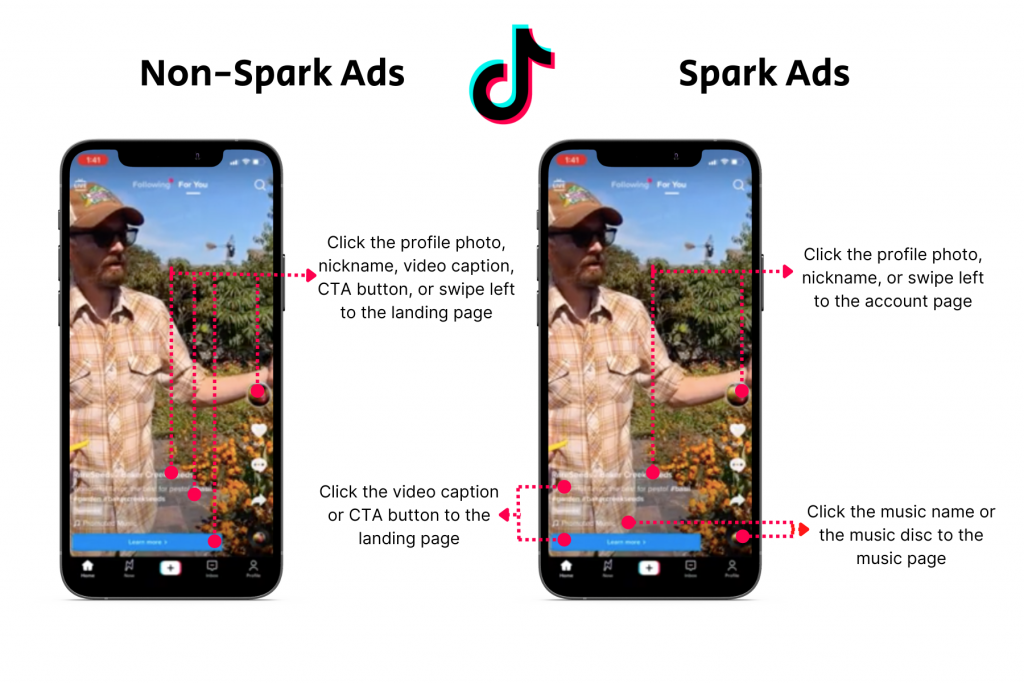
After setting up your ad group, it’s time to create the actual ad. TikTok offers several ad formats, including In-Feed Ads, TopView Ads, Branded Hashtag Challenges, and Branded Effects.
Steps to Create Your Ad:
- Ad Format:
- In-Feed Ads: Video ads that appear in the For You feed alongside user-generated content.
- TopView Ads: Full-screen video ads that appear when the user first opens TikTok.
- Branded Hashtag Challenge: Encourages users to create content based on your hashtag.
- Branded Effects: Special effects or filters that users can apply to their videos.
- Upload Creative:
- Upload the video or image you want to use in the ad. TikTok supports vertical video formats with a 9:16 aspect ratio.
- Ensure the video is engaging, has strong visuals, and includes music or sound that resonates with TikTok’s audience.
- Add Text and CTA (Call-to-Action):
- Include engaging text in your ad, but keep it brief. TikTok users tend to scroll quickly, so make sure your message is clear and attention-grabbing.
- Select a CTA button, like “Learn More,” “Shop Now,” “Sign Up,” etc., that aligns with your campaign’s goal.
- Preview Your Ad:
- TikTok Ads Manager lets you preview your ad before publishing it. Make sure it looks good on mobile devices and the video plays correctly.
6. Campaign Launch and Monitoring
Once your ad is set up, it’s time to launch your campaign. However, the work doesn’t stop there. You need to continuously monitor the campaign’s performance and make adjustments as needed.
Steps to Launch and Monitor Campaign:
- Review Your Campaign: Double-check your ad, budget, targeting, and CTA before launching.
- Launch Campaign: Click on the “Launch” button to start running your campaign. Once live, TikTok will start showing your ads to the selected target audience.
- Track Performance: Use TikTok Ads Manager Analytics to monitor key metrics such as:
- Impressions: The number of times your ad is shown.
- CTR (Click-Through Rate): The percentage of users who clicked on your ad after viewing it.
- CPC (Cost per Click): The average cost for each click on your ad.
- Conversion Rate: The percentage of users who completed a desired action (e.g., purchase, sign-up).
- ROI (Return on Investment): Calculate how much revenue was generated compared to the cost of the ad.
- Optimization: Based on performance data, you can:
- A/B Test: Run split tests with different ad creatives, targeting, or bidding strategies to see which performs best.
- Adjust Budget: Increase or decrease your budget based on the results.
- Refine Targeting: Narrow or expand your audience based on campaign insights.
7. Advanced Features
TikTok Ads Manager also offers advanced features for more experienced advertisers:
- Dynamic Product Ads: Automatically show relevant products from your catalog to potential customers.
- Retargeting: Target users who have previously interacted with your brand but haven’t yet converted.
- Custom Audiences: Create custom audiences based on website visits, video engagement, or app usage.
- Lookalike Audiences: Expand your reach by targeting audiences similar to your existing customers or high-value users.
8. Reporting and Analytics
TikTok Ads Manager provides in-depth reports to analyze the effectiveness of your campaigns.
Key Metrics to Track:
- Impressions: Number of times your ad was shown.
- Clicks: Number of times users clicked on your ad.
- Engagement: Includes likes, comments, shares, and video views.
- Conversions: Number of specific actions users completed (e.g., purchases, app installs).
- Cost Metrics: CPC, CPM, and CPA (Cost per Acquisition).
9. TikTok Pixel
TikTok Pixel is a tracking tool that allows you to measure conversions and optimize your campaigns. It’s a piece of code that you add to your website to track user interactions and gather valuable data for retargeting and optimization.
Steps to Set Up TikTok Pixel:
- Create a Pixel in TikTok Ads Manager.
- Add the Pixel code to your website’s header.
- Track important events like page views, add-to-cart actions, and purchases.
Conclusion
TikTok Ads Manager is an intuitive yet powerful platform that allows advertisers to create, manage, and optimize ad campaigns effectively. By setting clear campaign objectives, targeting the right audience, and continually monitoring performance, you can maximize the impact of your campaigns on TikTok. Whether you’re a small business or a large brand, TikTok Ads Manager gives you all the tools needed to succeed in the rapidly-growing TikTok advertising ecosystem.